ADA Website Compliance: Why Proof of Effort and Accessibility Audit Trails Matter
Posted on ADA Compliance | WCAG | The Americans with Disabilities Act

Accessibility comes first. Every business should strive to make its website accessible to everyone, including people with disabilities. The goal is to remove barriers and provide equal access to information, products, and services.
Proof of effort matters. Maintaining accessibility audit reports, developer timesheets, remediation records, and testing results demonstrates a business’s ongoing commitment to accessibility and may provide valuable documentation when complaints arise.
Establish an Accessibility Committee. Assign responsibility for reviewing, documenting, and improving both digital and physical accessibility throughout your organization.
Making your website accessible to everyone is the goal. Documenting your efforts demonstrates your commitment to getting there.
Website Accessibility Starts with Equal Access for Everyone
Website accessibility begins with a simple principle: Everyone deserves equal access to information, products, and services online.
For businesses, that means making a genuine, ongoing commitment to identifying and removing barriers that keep people with disabilities from using their websites.
Meeting accessibility standards isn’t just about avoiding legal complaints. It’s about creating an inclusive digital experience for every visitor.
Consider how many essential activities now happen online. People schedule medical appointments, make restaurant reservations, apply for jobs, purchase products, access financial information, and communicate with businesses via websites.
When a website isn’t accessible, some people may be unable to complete everyday activities independently.
That’s why businesses should strive to make their websites accessible to everyone, regardless of a visitor’s abilities or the assistive technologies they use.
But there’s another important responsibility that businesses sometimes overlook: documenting the work they do to achieve and sustain accessibility.
Accessibility evaluations, developer timesheets, remediation records, and ongoing testing document those efforts. These records help organizations measure progress, maintain accountability, and demonstrate their commitment when questions or complaints arise.
We’ve learned firsthand why that documentation matters. More importantly, we’ve learned that proof of effort should support a genuine accessibility program, not replace one.
For a broader explanation of accessibility standards and remediation, visit our Website ADA Compliance resource page.
A Real Experience That Changed How We Approach Accessibility
Several years ago, one of our clients received a demand letter from an attorney representing an individual who claimed they could not access certain content on the client’s website.
The letter alleged accessibility barriers and requested a monetary settlement.
This was our first direct experience helping a client respond to this type of website accessibility claim, and it taught us an important lesson about the value of documenting accessibility work.
Fortunately, we had maintained detailed timesheets documenting the work we performed to improve the website’s accessibility.
These timesheets provided dated records of our efforts and helped establish that accessibility was something we had been actively addressing rather than ignoring.
Producing this documentation made a significant difference. In our experience, it helped mitigate the financial impact on our client.
We’re intentionally keeping the client’s identity and the resolution details confidential. The outcome was specific to that situation and shouldn’t be interpreted as a prediction of how another accessibility complaint would be resolved.
However, the experience fundamentally changed our thinking.
We learned that accessibility documentation shouldn’t begin only after a demand letter arrives. It should be part of the website’s ongoing management process.
Today, we encourage our clients to maintain records of accessibility evaluations, developer timesheets, remediation work, testing, and ongoing reviews.
We also recommend establishing an Accessibility Committee to oversee and document accessibility concerns across the organization, including digital and physical accessibility.
The lesson was simple: Doing the work matters. Being able to demonstrate that you did the work matters, too.
What Does Proof of Effort Mean in ADA Website Compliance?
Proof of effort is the documented record of meaningful actions an organization has taken to identify, address, and prevent accessibility barriers.
It is not a certificate, a compliance badge, or a claim that a website is fully accessible.
Instead, it offers an evidence-based account of the organization’s accessibility activities.
Examples include:
- Initial accessibility evaluations and subsequent audit reports.
- Lists of identified accessibility issues and their severity.
- Developer timesheets documenting accessibility-related work.
- Records showing when issues were assigned and corrected.
- Developer notes explaining the changes made.
- Results from automated and manual accessibility testing.
- Screen reader and keyboard navigation testing records.
- Staff training and accessibility policy updates.
- Accessibility-related complaints and documented responses.
- Periodic evaluations following website updates.
An effective record should answer five basic questions:
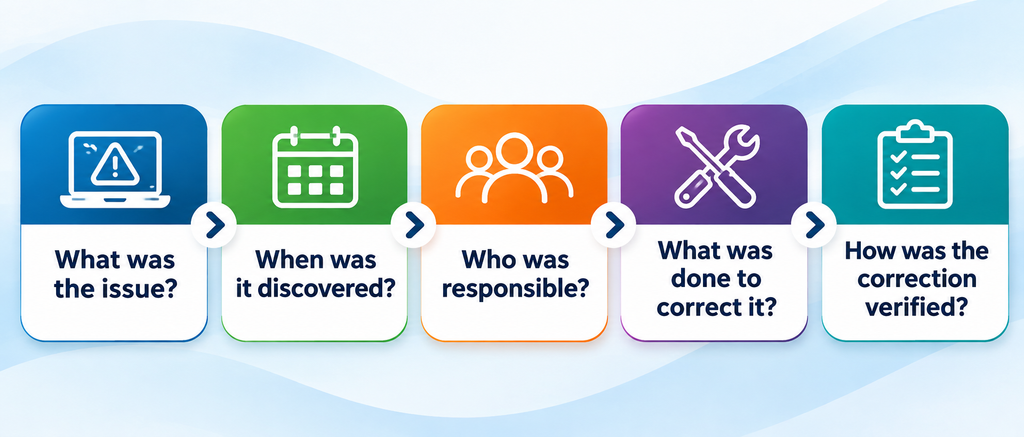
These records demonstrate an organized approach to accessibility.
They also make it easier to identify recurring problems, prioritize future improvements, and hold the relevant team members accountable.
Importantly, documentation must reflect the actual work. An impressive collection of reports means little if identified accessibility barriers remain unaddressed.
The purpose of documenting accessibility efforts isn’t to create a defense against complaints. It’s to help ensure that accessibility receives the consistent attention it deserves.
Understanding the Role of ADA Requirements and WCAG Standards
The Americans with Disabilities Act establishes protections against discrimination against people with disabilities.
The U.S. Department of Justice has explained that businesses open to the public and state and local governments have accessibility obligations that extend to their websites.
The Web Content Accessibility Guidelines (WCAG), developed by the World Wide Web Consortium (W3C), provide widely recognized technical standards for digital accessibility.
WCAG addresses accessibility considerations, including keyboard navigation, text alternatives, understandable content, and compatibility with assistive technologies.
An important distinction exists between public-sector and private-sector requirements.
In 2024, the Department of Justice established a technical standard, WCAG 2.1 Level AA, for many state and local government websites and mobile applications under ADA Title II. In April 2026, the Department extended the applicable compliance deadlines to April 2027 or April 2028, depending on the public entity.
For private businesses covered by ADA Title III, the Department has not established a single, universally applicable WCAG technical standard through an equivalent regulation. Nevertheless, WCAG remains a valuable framework for evaluating and improving website accessibility.
Businesses should work with qualified accessibility professionals and legal counsel when determining their specific obligations.
Regardless of which requirements apply, maintaining accurate records of accessibility work is a sound operational practice.
What Federal Court Cases Teach Us About Accessibility Documentation
Website accessibility litigation has produced court decisions that illustrate why completed remediation, credible evidence, and ongoing maintenance matter.
One particularly relevant example is Diaz v. The Kroger Co., decided in June 2019 by the U.S. District Court for the Southern District of New York.
In that case, the plaintiff alleged that accessibility barriers denied equal access to Kroger’s website.
Kroger presented evidence describing accessibility improvements and the company’s efforts to address the identified barriers.
The evidence included a detailed declaration from a company manager explaining that:
- Accessibility work had begun before the lawsuit.
- The specific barriers identified in the complaint had been corrected.
- The website had been evaluated against accessibility standards.
- The company intended to maintain accessibility going forward.
The court concluded that the plaintiff’s claims were moot based on the particular evidence presented and dismissed the case.
However, the court also discussed other cases in which businesses had not demonstrated that accessibility barriers were adequately resolved.
The lesson isn’t that an accessibility audit or remediation report automatically prevents litigation. Rather, the lesson is that credible evidence of completed corrective work can matter when a court evaluates the circumstances.
Whether remediation affects a particular claim depends on the facts, the applicable law, and the requested relief.
An accessibility plan alone isn’t the same as completed, verified remediation.
For business owners, this distinction reinforces the value of maintaining accurate records while actually correcting identified barriers.
Reference: Diaz v. The Kroger Co., June 4, 2019.
What Should an Accessibility Audit Trail Include?
An accessibility audit trail is a chronological record of evaluations, decisions, corrections, and testing for an organization’s accessibility program.
It provides continuity even when employees, website developers, or vendors change.
We recommend documenting accessibility throughout the website’s lifecycle.
1. Establish a Baseline Accessibility Evaluation
Begin by assessing the website’s existing accessibility barriers.
Tools such as WAVE, axe DevTools, and other automated testing systems can help identify issues.
However, automated testing alone is insufficient. Manual evaluations should include keyboard navigation, form interactions, focus management, and testing with appropriate assistive technologies.
Document the evaluation date, pages or functionality tested, standards assessed, tools used, findings, and limitations.
The W3C’s WCAG Evaluation Methodology (WCAG-EM) provides a structured approach to evaluating accessibility and documenting findings.
2. Document Remediation Work
Every significant accessibility issue should have a corresponding remediation record.
For example, if a website’s contact form cannot be completed with a keyboard alone, the record should identify the barrier, describe its impact, assign responsibility, and document the corrective action.
Include the date of implementation and any supporting development records.
Developer timesheets can be particularly valuable because they document when accessibility work was performed and how much time was devoted to specific corrections.
For WordPress websites, project management systems, development tickets, timesheets, and version-control histories can serve as useful supporting documentation.
3. Verify That Corrections Work
Closing a development ticket doesn’t necessarily mean that an accessibility barrier has been resolved.
The corrected functionality should be retested.
Where appropriate, verification should include manual testing and assistive technology.
Document the testing method, results, date, and person responsible.
If the correction does not fully resolve the problem, keep the issue open until an appropriate solution is implemented and verified.
4. Maintain Records of Ongoing Monitoring
Websites change constantly.
New pages are published, plugins are updated, forms are modified, and third-party services are added.
Each change can create new accessibility barriers.
Periodic evaluations and testing after significant website changes help identify these problems.
Maintain dated reports and records showing what was reviewed, what was found, and what actions followed.
5. Document Accessibility Complaints and Responses
If a visitor reports difficulty accessing your website, treat the complaint as valuable feedback.
Record when the complaint was received, the reported barrier, the response provided, and the steps taken to investigate and resolve the issue.
When a visitor cannot complete an essential transaction, provide a timely, accessible way to obtain assistance while working to correct the underlying barrier.
Protect personal information in these records, limit access as appropriate, and coordinate legal matters with counsel.
An effective audit trail should improve accessibility, not merely serve as evidence for potential disputes.
Create an Accessibility Committee, Even If Your Business Is Small
One of our strongest recommendations is to form an internal Accessibility Committee.
This committee doesn’t need to be either large or complicated.
For a small business, it might include the owner or general manager, a marketing representative, and a website administrator or a development partner.
Larger organizations may include representatives from human resources, facilities, technology, customer service, and executive management.
The committee should have a clearly designated leader responsible for organizing meetings, tracking outstanding issues, and maintaining documentation.
Its purpose is to establish ongoing organizational accountability.
Address Both Digital and Physical Accessibility
Although website accessibility is our focus, accessibility responsibilities extend beyond digital content.
A business may have an accessible website while customers encounter barriers at its physical location.
Conversely, a building may offer accessible entrances and facilities while its online reservation system remains inaccessible to people who use assistive technologies.
An Accessibility Committee should review accessibility across the organization, including:
- Websites, mobile applications, electronic documents, and online forms.
- Digital communications, videos, and customer-facing technologies.
- Building entrances, parking, signage, and other physical access considerations.
- Employee procedures, training, and customer service practices.
- Complaints, identified barriers, corrective actions, and follow-up evaluations.
Not every committee member needs technical accessibility expertise.
However, the committee should have access to qualified professionals who can evaluate specific issues and recommend appropriate corrective measures.
Establish a Regular Review Schedule
We recommend that businesses hold quarterly Accessibility Committee meetings, with additional reviews after significant website changes or reported problems.
Each meeting should produce a brief written record identifying:
- Accessibility concerns reviewed.
- Progress on previously identified barriers.
- New corrective actions and responsible parties.
- Target dates and follow-up requirements.
- Issues requiring additional professional evaluation.
Meeting minutes, remediation reports, and supporting records should be stored in a secure, organized location.
This creates an institutional history of accessibility work rather than relying on individual employees to remember what happened.
A Practical Example of an Accessibility Audit Trail
A useful audit trail doesn’t require expensive software or a complex reporting system.
Consider the following example of a website accessibility issue.
| Field | Example Record |
| Date identified | September 8, 2026 |
| Accessibility issue | Contact form fields missing accessible labels |
| Standard referenced | WCAG 2.2, Success Criterion 1.3.1 |
| Priority | High |
| Assigned to | Website development team |
| Corrective action | Added programmatic labels to form fields |
| Development time | 1.5 hours |
| Date completed | September 10, 2026 |
| Verification | Manual screen reader and keyboard testing |
| Status | Resolved and verified |
Illustrative example, not an actual client record.
This simple record establishes what happened, when it happened, and how the issue was addressed.
A spreadsheet or a project management platform such as Trello can serve as an accessible, practical starting point. More sophisticated organizations may integrate accessibility issue tracking into their existing development and governance workflows.
The key is consistency.
Why Accessibility Overlays and Automated Reports Aren’t Enough
Some website owners assume that installing an accessibility overlay or running an automated scan is sufficient evidence of compliance.
That’s a dangerous assumption.
Automated tools can identify many accessibility problems, but they cannot reliably assess the user experience or determine whether all WCAG requirements are met.
For example, a scanner might identify that an image contains alternative text without determining whether that text meaningfully describes the image.
Similarly, an automated tool may not fully assess whether a complex reservation or checkout process works effectively with a screen reader.
The Department of Justice recommends combining manual accessibility checks with automated evaluation tools.
We believe accessibility should be addressed through the website’s underlying design, content, and functionality rather than relying on an overlay as the primary solution.
Our approach emphasizes native remediation, testing, verification, and continuing maintenance.
An automated report can be part of the audit trail. It should never be taken as conclusive proof that the website is accessible.
Publish an Accessibility Statement and Provide a Feedback Mechanism
Businesses should also consider publishing an Accessibility Statement on their websites.
The statement should explain the organization’s commitment to accessibility, identify the standards used where appropriate, and provide a way for visitors to report barriers or request assistance.
It should reflect the website’s actual accessibility status.
Avoid making absolute claims of complete compliance unless the organization has appropriate evidence to support them.
The W3C provides an Accessibility Statement Generator that businesses can use as a starting point.
A public statement is not a substitute for an internal audit trail.
Instead, the two should complement one another.
The statement outlines the organization’s accessibility commitment and reporting options. The audit trail documents the work supporting that commitment.
Accessibility Is an Ongoing Business Responsibility
One of the biggest misconceptions about ADA website compliance is that accessibility can be completed once and then forgotten.
It can’t.
A website that performs well in an accessibility audit can introduce new barriers after a design update, plugin change, or new content publication.
Accessibility requires continuing attention.
That’s why we encourage organizations to adopt a structured process:
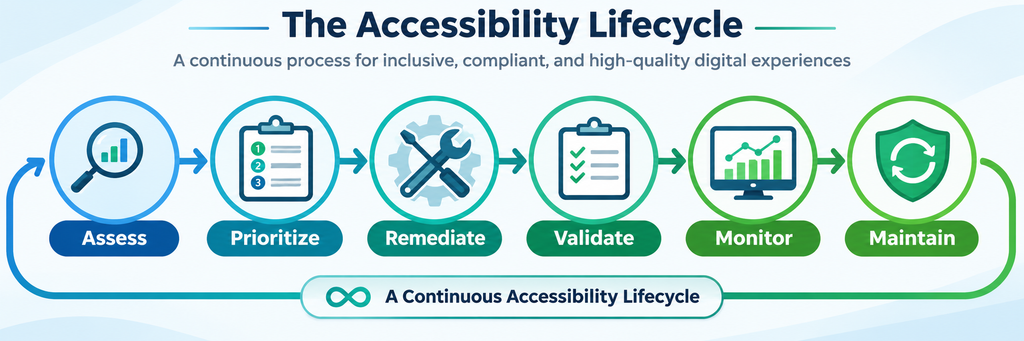
Documentation should accompany every stage.
The goal is to establish an operating practice in which accessibility is integrated into website management, employee training, content publishing, and organizational decision-making.
Businesses that follow this approach are better positioned to understand their accessibility challenges, demonstrate their improvement efforts, and respond constructively to concerns.
Most importantly, they are better equipped to deliver accessible experiences for their customers and communities.
Accessibility Comes First. Documentation Demonstrates the Commitment.
Every business should strive to make its website accessible to everyone, regardless of ability or the technology used to access it.
That’s the fundamental goal of website accessibility.
Achieving that goal requires more than a one-time audit or a set of technical fixes. It demands ongoing evaluation, meaningful remediation, testing, and a commitment to continuous improvement.
Documenting those efforts is an important part of the process.
Our experience with a client’s accessibility demand letter taught us that developer timesheets, audit reports, and remediation records can be valuable when questions arise. But their greatest value goes beyond responding to legal complaints.
They help businesses track progress, establish accountability, and ensure that accessibility remains an organizational priority.
An Accessibility Committee can help reinforce that commitment by addressing both digital and physical accessibility throughout the organization.
Make your website accessible because it’s the right thing to do for your visitors. Document your efforts because accountability and continuous improvement matter.
At the end of the day, accessibility isn’t about checking boxes or creating a paper trail.
It’s about people.
Learn more about our approach to Website ADA Compliance and Accessibility.
Accessibility is a practice, not a product.
Frequently Asked Questions About ADA Proof of Effort
Does documenting ADA website compliance efforts protect my business from lawsuits?
No. Documentation does not guarantee protection against an ADA complaint, lawsuit, or financial liability. However, credible records of accessibility evaluations, completed remediation, developer timesheets, and ongoing maintenance may help demonstrate the actions your organization has taken. Legal outcomes depend on the specific circumstances, applicable law, and the evidence presented.
What records should a business maintain for website accessibility compliance?
Businesses should maintain accessibility audit reports, records of identified issues, developer timesheets, remediation records, testing results, relevant training records, and accessibility complaints with their resolutions. Each record should include dates, responsible parties, corrective actions, and verification results, when applicable. These records provide a useful history of accessibility work.
How often should an Accessibility Committee meet?
Quarterly meetings are a practical starting point for many businesses. Organizations with frequently updated websites, complex digital services, or significant accessibility concerns may need more frequent reviews. The committee should also respond promptly to reported barriers and review accessibility after substantial website or operational changes.
Is an automated accessibility scan enough to demonstrate ADA website compliance?
No. Automated scanners identify some accessibility issues but cannot assess every requirement or user experience. A comprehensive approach combines automated testing, manual evaluation, assistive technology testing, remediation, and documented verification. Automated reports are valuable supporting evidence, but they should not be treated as conclusive proof of accessibility.
Disclaimer: This article is for general educational and informational purposes only and does not constitute legal advice. Accessibility obligations and legal outcomes vary by organization and jurisdiction. Consult qualified legal counsel for advice on specific ADA requirements, complaints, litigation, or record-retention obligations.