

Avon Calling? No, Darling, It’s Google’s AI. And It Wants Your Price List.
Posted on Zero-Click Search | AI Search | Google My Business

Estimated reading time: 12 minutes
Key Takeaways
- Google’s ‘Have AI Get Prices’ changes local search by acting as a personal assistant for users.
- This feature automates information gathering from local businesses, reducing the need for customer clicks.
- Businesses must optimize their Google Business Profile and prepare staff for AI interactions to benefit from this shift.
- The rise of zero-click searches means leads can be generated without users ever visiting a business’s website.
- Participating in this AI-driven process is crucial for SMBs to capture leads and stay competitive.
How Google’s “Have AI Get Prices” is Revolutionizing Local Search & Zero-Click Optimization
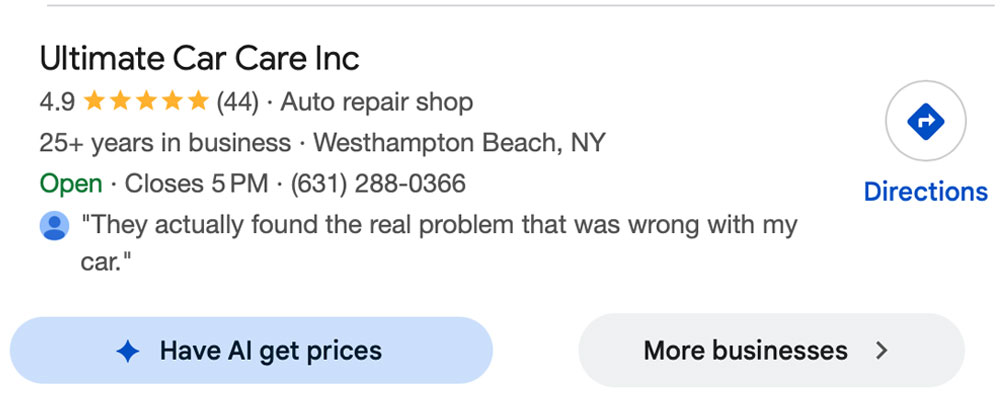
For decades, the fight for local customers on Google focused on visibility. Whether it was ranking high in organic search, dominating the local map pack, or securing the top spot in Local Services Ads, the goal was clear: make sure your business appeared when a customer searched. The customer would then click, browse your website, read reviews, and hopefully – call or visit.
This traditional model, although still relevant, is now undergoing a major shift thanks to Google’s new “Have AI Get Prices” feature. This isn’t just another ranking adjustment; it’s an agentic AI acting on behalf of the customer, fundamentally changing the customer journey and prompting small and medium-sized businesses (SMBs) to rethink their entire local search approach, especially with the rise of “zero-click” interactions.
What is “Have AI Get Prices”?
At its core, “Have AI Get Prices” is Google’s advanced AI acting as a personal assistant for search users. When a customer searches for a local service on Google, they might now see a prominent prompt – often a button or a “pill” – within the search results (or sometimes within the Local Pack or SGE answers) that says “Have AI Get Prices.”
Upon clicking, the user provides a brief description of the service they need, possibly including details like preferred timing or specific requirements. Importantly, at this stage, the human customer’s role is complete. Google’s AI then takes over, identifying relevant, high-ranking local businesses. The AI then makes automated phone calls to these businesses. During these calls, the AI clearly states that it is Google calling on behalf of a customer, explains the service request, and actively seeks specific information such as:
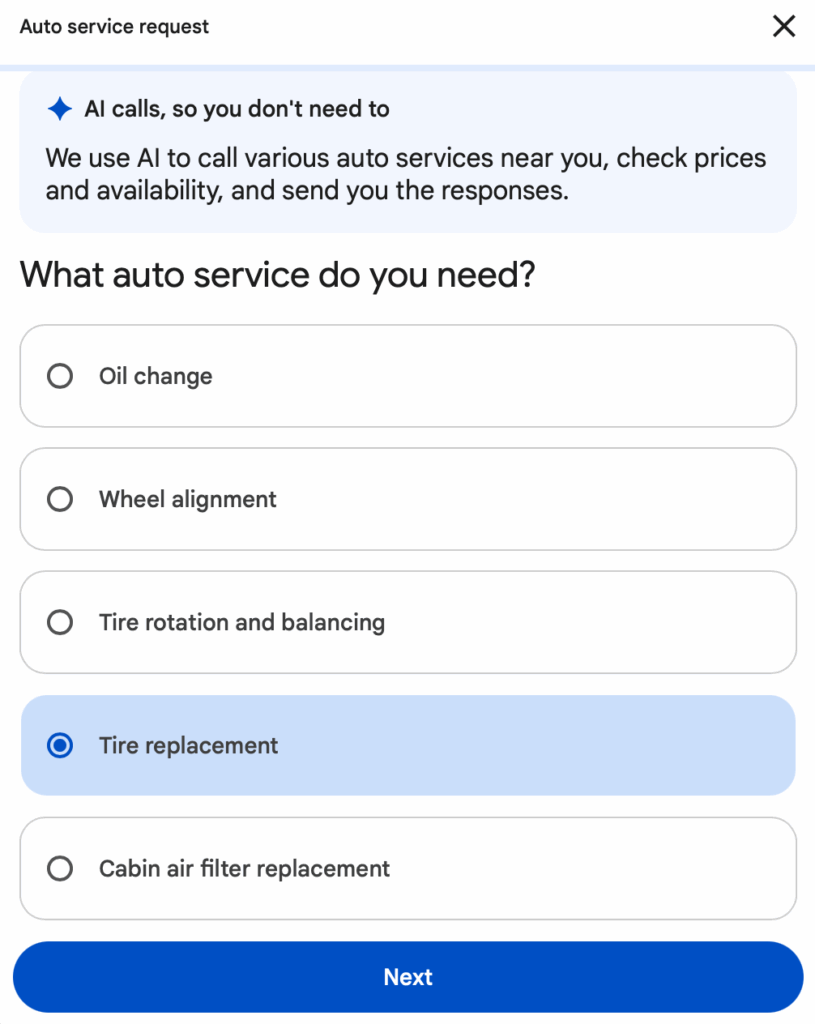
- A price or price range for the requested service.
- Availability or appointment times.
- Any other pertinent details the customer specified.
Once the AI successfully gathers information from multiple businesses (or records which ones it couldn’t reach), it creates a brief summary. This summary – including quotes, availability, and business names – is then sent directly to the customer via email or SMS, usually within a short period (often 30 minutes or less).
This is a game-changer. The AI doesn’t just display information; it collects it. It turns a browsing customer into a qualified lead, skipping many traditional steps in the customer journey.
The Shift in Search: From Discovery to Agency
Traditionally, Google Search focused on discovery. Customers found businesses and then took action. With “Have AI Get Prices,” the AI itself becomes the agent of action.
Impact on Traditional Local Search
- Reduced Website Clicks: The main aim of many SEO strategies is to increase traffic to a website. While websites are still essential for deeper engagement and building trust, the initial “information gathering” phase can now occur entirely off-site, coordinated by AI. This results in fewer direct clicks to your homepage for initial price inquiries.
- Reduced Importance of Manual Outreach: Customers no longer need to call multiple businesses or fill out many contact forms individually. The AI simplifies this process, potentially decreasing the number of direct inbound price-shopping calls a business receives by centralizing them through Google’s AI.
- New Urgency for Real-Time Data: The AI demands real-time or near real-time information. A static “contact us for a quote” on your website is less effective if the AI can’t get a specific number. Businesses that can quickly and accurately provide pricing and availability will win.
The Rise of Zero-Click Optimization on Steroids
“Zero-click searches” refer to instances in which a user finds the answer to their query directly on the Google Search Results Page (SERP) without clicking through to a website. Features like Featured Snippets, Knowledge Panels, and local packs already contribute to this.
“Have AI Get Prices” elevates zero-click to a whole new level.
- Zero-Click Conversion Potential: Instead of ending with the user simply knowing an answer, it now concludes with the user receiving a curated list of actionable quotes. This shifts zero-click from just providing information to directly generating leads for the customer, powered by AI.
- “Zero-Click” for the Business: For a business, being included in an AI-generated quote summary means gaining a lead without the customer ever visiting their website or directly engaging with them initially. The entire information-gathering process occurs behind the scenes.
- Data-Driven Selection: The AI’s choice of businesses isn’t random. It uses Google’s understanding of your business (from your Google Business Profile, website, and reviews) to judge relevance and quality. This makes strong GBP optimization more important than ever, not just for people but for algorithms.
What Types of Businesses Does This Cover?
“Have AI Get Prices” mainly targets local service businesses where customers often request quotes, appointments, or availability for specific tasks. As Google gradually rolls out and broadens this feature, the primary and most noticeable uses are in sectors like:
- Automotive Services: Auto repair shops, oil change centers, tire shops, car detailing.
- Beauty & Personal Care: Hair salons, barbershops, nail salons, spas.
- Home Services: Plumbers, electricians, HVAC technicians, house cleaners, landscapers, pest control (though some home services may fall under Local Services Ads as well).
- Pet Services: Pet grooming, dog walking, pet sitting.
- Professional Services (Limited): Some service-based professionals where pricing for a standard service can be quoted (e.g., specific tax preparation packages, basic legal consultations).
The common thread is that these are services where customers often comparison shop for price and availability, and where the service itself is usually well-defined enough for an AI to accurately inquire about.
How Do Businesses “Set This Up”?
The key insight for SMBs is that there isn’t a separate “sign-up” button for “Have AI Get Prices.” Instead, businesses “participate” by maintaining a strong, optimized presence on Google and being ready to engage with the AI. Think of it less as launching a new feature and more as enhancing your existing digital infrastructure and operational readiness.
Here’s a detailed breakdown of how businesses can position themselves to be included and attract leads from this feature:
1. Master Your Google Business Profile (GBP)
Your GBP is the foundation of local search, and it’s where Google’s AI collects essential information about your business.
- Complete & Accurate Information:
- Verification: Ensure your GBP is fully verified. Unverified profiles won’t show up.
- Hours: Keep your business hours meticulously updated, including special hours for holidays. The AI will call during these hours.
- Services: List all your services clearly and comprehensively. For each service, provide as much detail as possible, including descriptions and, ideally, price ranges or starting prices. Google’s AI is looking for structured data.
- Categorization: Use the most specific primary and secondary categories for your business.
- Photos: High-quality photos enhance your profile’s appeal to customers and signal an active business to Google.
- Reviews Management:
- Solicit & Respond: Actively encourage customers to leave reviews. Respond professionally and promptly to all reviews, positive and negative. A strong review profile boosts your local ranking, making you more likely to be selected by the AI.
- Keywords in Reviews: While not directly controllable, customer reviews that naturally mention services and positive experiences reinforce your GBP’s relevance.
- Q&A Section: Monitor and answer questions in your GBP’s Q&A section. This provides more context for both human users and Google’s AI.
2. Optimize Your Website for AI Readability & Price Transparency
While the AI calls, it can also rely on website data if the call fails or to supplement information.
- Dedicated Services & Pricing Pages: Create clear, easy-to-navigate pages on your website that explicitly list your services and, crucially, their prices or transparent price ranges.
- Example: Instead of just “Brake Repair,” have “Brake Repair Services” with sections for “Brake Pad Replacement ($150-$250 per axle)” and “Rotor Resurfacing ($50-$80 per rotor).”
- Structured Data (Schema Markup): Implement schema markup (e.g., Service or Product schema) on your service pages to explicitly tell search engines what your services are, what they cost, and other attributes. This is invaluable for AI comprehension.
- FAQs Page: Create a comprehensive FAQ page that directly answers common customer questions, especially those related to pricing, appointment booking, and typical service durations. Use clear, concise answers.
- Mobile-Friendly & Fast: A well-optimized, fast-loading, mobile-friendly website is always crucial for SEO and implicitly signals a professional, modern business to Google.
3. Prepare Your Operations for AI Interaction (The New Frontier)
This is perhaps the most innovative and important part of adapting to “Have AI Get Prices.” Your physical phone answering process now directly impacts your Google ranking and lead generation.
- Staff Training:
- Awareness: Inform all staff who answer the phones that they might receive calls from “Google’s AI on behalf of a customer.” This is not a spam call or a telemarketer.
- Identify the AI: Train staff to listen for the automated Google announcement at the beginning of the call.
- Concise Responses: Practice providing clear, direct answers to common pricing and availability questions. The AI is looking for specific data points, not extended sales pitches or complex explanations.
- Example: AI asks for “price of an oil change.” Staff should respond: “A standard oil change is $79.99. We have availability this Wednesday at 10 AM or 2 PM.” Avoid: “Well, it depends on the type of oil, and if you need filters, we have a special running…” The AI wants direct answers.
- Key Information: Ensure staff know the current pricing for your most popular services and immediate availability offhand, or know exactly where to quickly access it.
- Optimize Call Answering:
- Promptness: Answer calls quickly during business hours. The AI won’t wait indefinitely.
- Direct Access: If your business uses a phone tree, ensure there’s a direct, easily navigable option for immediate service inquiries that the AI can successfully follow. Complex phone systems might confuse the AI and cause the call to fail.
- Consistent Availability: Ensure your phone lines are adequately staffed during your stated business hours. Missed calls mean missed opportunities.
- Integrate with Booking Systems (Future Proofing): As this feature evolves, direct integration with online booking systems (e.g., through Google’s own “Reserve with Google” integrations or direct scheduling links in your GBP) could become even more seamless, allowing the AI to check availability even without a phone call.
4. Monitor & Adapt
- Check Performance: While Google doesn’t currently provide explicit dashboards for AI-driven quote requests, monitor your overall lead flow. If you see an increase in emails/SMS from Google with customer requests, you’re likely being included.
- Listen to Calls: If you record calls (with proper consent), periodically review calls identified as coming from Google’s AI to assess how well your staff are handling them and identify areas for improvement.
- Stay Informed: Google’s AI capabilities are evolving rapidly. Stay updated on official announcements and industry news regarding new features in Search and Google Business Profile.
Opting Out: A Word of Caution
Businesses can choose to opt out of these automated calls. This setting is usually located in your Google Business Profile under “Advanced settings” or “Bookings and inquiries from customers,” often labeled something like “Google automated calls and text messages.”
However, opting out means you will not be included in the AI-generated quote summaries for customers using this feature. In an increasingly AI-driven search landscape, this essentially makes your business invisible to a growing segment of high-intent customers who prefer the convenience of having the AI shop for them. For most SMBs, the benefits of participating and potentially gaining new leads significantly outweigh the inconvenience of receiving automated calls.
The Future is Conversational and Agentic
“Have AI Get Prices” is more than just a new search feature; it’s a sign of the future of local search. It indicates a shift toward a more conversational, agentic, and ultimately more convenient search experience for consumers. For SMBs, it means that local search optimization is no longer just about visibility; it’s about AI-readiness—making sure your data is accurate, your pricing is transparent, and your operational processes can easily work with an AI agent. Those who adapt quickly will discover a powerful new channel for lead generation, while those who stick to outdated strategies risk being left behind in the quiet, efficient shadow of Google’s AI. The game has changed, and the conversation has just started.
Frequently Asked Questions About “AI Get Prices”
How does “Have AI Get Prices” affect my Google Business Profile (GBP) ranking?
The feature doesn’t directly create a new ranking factor, but it amplifies the importance of existing ones. Google’s AI will primarily call businesses that rank well in the local map pack. This means having a complete, well-optimized GBP with accurate hours, detailed service listings, and a high volume of positive reviews is more critical than ever, as these factors determine who the AI selects to call.
How can I ensure my staff handles the AI calls correctly?
The key is training and scripting. Inform all staff that they may receive an automated call from Google’s AI (it will announce itself clearly). Train them to respond with clear, concise price ranges and immediate availability for the requested service. Avoid long sales pitches or complex phone trees, as the AI needs simple data points to report back to the customer.
Should I include specific pricing on my Google Business Profile or website?
Yes, absolutely. Transparency and specificity are crucial. While you don’t have to list a static price, listing a price range(e.g., “$100 – $150”) or a starting price for services on your GBP and website’s service pages gives the AI (and human customers) the data they need. This makes it easier for the AI to collect information, increasing your chance of being included in the quote summary, even if the phone call is missed.
Can I opt out of receiving these automated calls, and what are the consequences?
Yes, you can opt out. This setting is usually found within your Google Business Profile under Advanced settings related to customer bookings and inquiries (often labeled “Google automated calls and text messages”). However, opting out means your business will not be included in any of the quote summaries generated by this AI feature. For most SMBs, this means losing out on a new, high-intent lead source and becoming invisible to customers who rely on this feature.